Instagram Career Fair Promotion: A 3-Post Strategy That Works
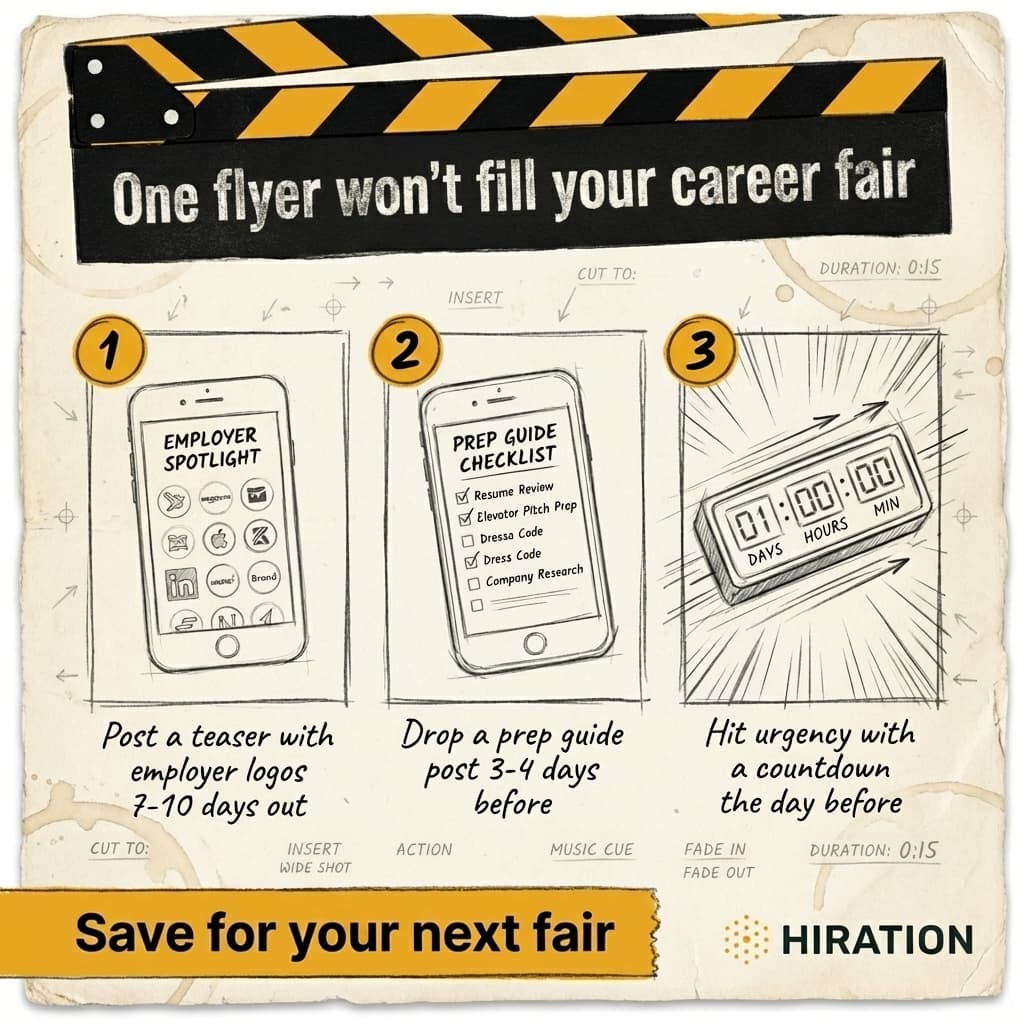
Visual by Campaign Studio · Generate your own for free
The career centers filling their fairs aren't posting more often. They're posting more strategically. Specifically, a simple three-post Instagram sequence, timed across the final ten days before your event, consistently outperforms the one-and-done flyer approach that most institutions default to.
We've watched this play out across 100+ colleges and universities. The pattern is clear. One generic announcement posted two weeks out, then silence, then a "reminder" the day before. Attendance stays flat. Staff gets frustrated. The fair gets blamed. But the fair isn't the problem. The promotion is.
Why a Single Announcement Post Falls Flat
Students scroll past roughly 300 feet of content per day on their phones. A single career fair flyer, no matter how well-designed, is competing against memes, Reels, stories from friends, and algorithm-boosted content from accounts with million-dollar budgets. You get one shot at attention, and if the student isn't in "career mode" at that exact moment, it's gone.
There's a deeper issue, though. A single post can only do one job. It can announce. But announcement alone doesn't address the three psychological barriers standing between a student and actually showing up: they don't know why they should care, they don't know what to do when they get there, and they don't feel any urgency to commit.
One post can't solve all three. Three posts can.
If your career services team runs social campaigns, Campaign Studio can save you a few hours each week.
See how it worksWhat Does the Ideal Instagram Career Fair Sequence Look Like?
Think of it as a mini-campaign with three distinct beats, each timed to match where students are in their decision-making process.
Post 1: The Employer Reveal (7-10 days out)
This is your curiosity builder. Feature 6-8 recognizable employer logos in a clean grid or carousel. The caption should be short and punchy, something like: "These companies are coming to campus on October 17. Are you?" Tag the employers if possible. Many will reshare, which instantly expands your reach beyond your own followers.
Why employer logos specifically? Because students don't attend career fairs for the concept of networking. They attend because a specific company they recognize will be in the room. A sophomore who's bought Nike shoes her entire life will stop scrolling when she sees that swoosh on your post. Abstract "come network with employers" language doesn't trigger that same recognition.
At a 4,000-student liberal arts college we worked with, an employer logo carousel got 3x the engagement of their standard fair announcement. Not because the design was better. Because the content matched what students actually care about.
Post 2: The Prep Guide (3-4 days out)
This is your friction reducer. A carousel or Reel that answers the unspoken questions running through a student's head: What do I wear? Do I need a resume? What do I actually say to a recruiter? How long should I stay?
Framing matters here. Don't title it "Career Fair Preparation Tips." That sounds like homework. Try "What to bring to Thursday's career fair (and what you can skip)" or "Your 5-minute career fair game plan." The goal is to make attendance feel easy and low-stakes, especially for first-gen students or freshmen who've never been to one.
Include specifics. "Business casual means a nice top and clean jeans are fine. You don't need a suit." Give them a sample 30-second intro. Tell them exactly how many resumes to print ("bring 10, you'll probably hand out 4-6"). The more concrete the advice, the less intimidating the event feels.
This post is also doing something subtle. It's assuming the student is already going. You're not asking "Will you attend?" anymore. You're helping them prepare. That shift in framing nudges undecided students toward yes.
Post 3: Social Proof and Urgency (day before or morning of)
This is your momentum play. Share a concrete number: "347 students have already registered. Walk-ins welcome, but spots at employer tables fill fast." Or post a screenshot of your registration dashboard with the count visible. If you had a successful fair previously, use a photo of a packed room.
Social proof works because college students are deeply influenced by peer behavior. "Hundreds of other students are doing this" is more persuasive than any career development argument you could make. Pair the social proof with a mild urgency cue, not fake scarcity, but honest context. "Employers start packing up at 3pm" or "Morning sessions tend to have shorter lines" gives students a reason to act now rather than deciding later (which usually means never).
Timing and Format Choices That Matter
Post the employer reveal as a static carousel. Carousels get saved and shared more than single images on Instagram, and saves signal the algorithm to boost reach. The prep guide works well as either a carousel (for step-by-step tips) or a short Reel (under 60 seconds) if your team has the capacity. The urgency post should be both a feed post and a Story with a countdown sticker or poll.
Stories disappear in 24 hours, which creates natural urgency. But they also have lower reach than feed posts for accounts under 5,000 followers. So don't rely on Stories alone for any of the three beats. Post to the feed first, then repurpose to Stories.
One scheduling note that trips people up: don't post all three on weekdays at 9am because that's when your office is open. Post when students are on Instagram. For most campuses, that's between 7-9pm on weeknights and mid-morning on weekends. Check your Instagram Insights under "Your Audience" for your specific peak times.
How Do You Adapt This for a Small Career Center?
If you're a two or three-person team serving thousands of students, this sequence might sound like extra work you can't afford. It's actually less work than most people think.
The employer reveal is a Canva template with logo images pulled from company websites. Twenty minutes, tops. The prep guide can be repurposed from content you already have, like that career fair tip sheet PDF sitting on your website that nobody downloads. Reformat it as a carousel. The urgency post is a quick photo or screenshot with two sentences of caption.
Total time investment across all three posts: about 90 minutes spread over a week. Compare that to the hours your team spends setting up tables and printing name badges for a fair that gets 40% of the attendance it should.
You can also batch-create these templates once and reuse them every semester with updated logos, dates, and registration numbers. The structure stays the same. The content just gets refreshed.
The Mistake That Undermines Everything
Career centers that try this sequence sometimes still underperform because they write captions like institutional press releases. "The Office of Career Development is pleased to announce our Fall Career & Internship Fair featuring over 50 employers from diverse industries." Nobody talks like that. Nobody reads it.
Write the way you'd text a student who asked what's happening on campus this week. Short sentences. Specific names. Direct address. "Deloitte, Nike, and the FBI are coming to campus next Thursday. Seriously. Here's what you need to know." That's a caption a student will actually read past the first line.
Your Instagram bio should also have a direct link to fair registration, not your general career services homepage. Every post in the sequence should drive to that same link. Reduce the number of clicks between seeing your post and registering to exactly one.
Start With Your Next Fair
Pull up your calendar and find your next career fair date. Count back ten days. That's when Post 1 goes up. Block 30 minutes this week to draft all three captions and pull together the employer logos. Schedule them using Instagram's native scheduler or a tool like Later. That's it. Three posts, strategically timed, each doing a different job. Run this once and compare your registration numbers to last semester. The data will make the case for you.
Frequently Asked Questions
How far in advance should you start promoting a career fair on Instagram?
Start 7-10 days before the event with your first post. Posting earlier than two weeks out is mostly wasted effort because students don't plan that far ahead. A tight 10-day window with three strategic posts beats a month of scattered reminders.
What type of Instagram post gets the most engagement for career services?
Carousels consistently outperform single-image posts for career services accounts because they get more saves and shares, which boost algorithmic reach. Employer logo reveals and step-by-step prep guides work especially well in carousel format.
How do I get more students to attend our campus career fair?
Focus promotion on specific employer names rather than generic networking language. Students decide to attend based on recognizing companies they want to work for. Pair that with a practical prep post that makes attending feel low-stakes, especially for first-years and first-gen students who may find career fairs intimidating.
What should a career fair Instagram caption sound like?
Write the way you'd text a student, not the way you'd write a press release. Short sentences, specific company names, and direct address ("you") outperform formal institutional language. A caption like "Deloitte and Nike are hiring on campus Thursday" beats "We are pleased to announce our annual career fair" every time.
Your Career Services team is already doing this work manually
Campaign Studio turns one idea into a full campaign across Instagram, LinkedIn, email, Handshake, and LMS. Weekly engagement runs on autopilot. Event campaigns build on demand.
Run Your First Campaign